See FieldCraft fields in a space
As a space admin, see which FieldCraft fields work in your space, and recalculate their values there.
You don't need a Jira admin for this. Jira admins still create and change the fields.
Before you begin
-
Jira permission: Administer projects in the space, or Jira admin.
-
FieldCraft: installed, with an active license.
Open the FieldCraft page
-
In your space, select Space settings.
-
In the sidebar, select FieldCraft. The page lists the fields in this space.
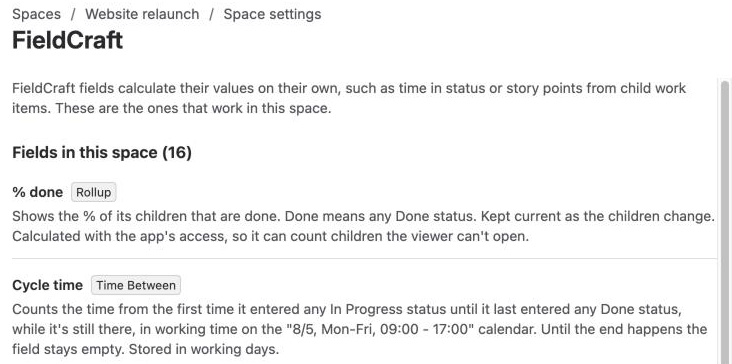
Result: You see Fields in this space, with the number of fields.
People without Administer projects see Only this space's admins can see what FieldCraft does here.
What the field list shows
Each field shows its name, its type and a description of what it calculates.
Read the description to learn what the field shows in your space. It comes from the configuration that applies here.
A configuration for this space wins over the one for all spaces.
If no field works here yet, you see No FieldCraft field works in this space yet.
Waiting for a Jira admin
Some fields read data with the app's access, for example Parent Field, Rollup and Jira expressions.
They can show data from work items that some viewers can't open.
Such a field shows Waiting for a Jira admin until a Jira admin acknowledges it. Until then, it keeps its last value.
Contact a Jira admin to acknowledge it. See Acknowledge app access.
Recalculate in this space
Values update on their own when work items change.
Run a recalculation if some look out of date, for example after a Jira admin set up or changed a field.
-
Under Recalculate this space, select Recalculate in this space. The Recalculate this space? dialog opens.
-
Select Recalculate.
Result: You see Recalculation started. FieldCraft recalculates every field on every work item in the space, in the background.
Leave the page when you like. The work goes on.
Check the status line for progress, for example Recalculating: X of about N work items so far.
A large space can take a while, because the work fits into the hourly calculation budget.
Check back later. Values fill in as it goes.
The button is unavailable while a recalculation runs, or when no field calculates in this space.
When it finishes, the status line says what it did, for example Last recalculation finished: 8 work items checked, 10 values changed.
A space admin can run it again an hour after the last recalculation finished. If you try sooner, you see This space was recalculated less than an hour ago. It can run again in N minutes. If two other spaces' recalculations already wait on the site, you see Recalculations of other spaces are already waiting. Try again once one of them has finished. Jira admins aren't limited.
Fields waiting for a Jira admin stay out of the recalculation.
Your recalculation also appears as a reindex on the admin page's Calculation and Activity tabs.
Ask your Jira admin
Contact your Jira admin to add a field, or to change what one calculates.
Include which field you need and what it should show.
They manage FieldCraft in Settings (⚙) > Marketplace apps > FieldCraft: Custom Fields. There they create fields, choose the spaces they work in, and add them to screens.
Related
-
How values stay current: when FieldCraft recalculates values on its own.
-
Recalculate existing work items: how Jira admins recalculate across the site.
-
Permissions: what space admins and Jira admins can do.