Acknowledge app access
Let a field that reads other work items start calculating, once you accept who can see its values.
Until a Jira admin acknowledges it, such a field stays paused.
Check what the field reads before you acknowledge it.
Which fields need it
These field types read other work items:
-
Jira Expressions - Text, Number, Date, Date & time and User read whatever the expression reads.
-
Rollup reads the work item's children.
-
Parent Field, Parent Field - User, Parent Field - Date and Parent Field - Number read the work items above, or the linked work items.
Every other FieldCraft type reads only the work item itself, and needs no acknowledgement.
What it means for privacy
FieldCraft calculates these fields on the server, so their values stay current in search, boards and exports.
To do that, it reads with the app's access.
That can include spaces and work items that the person viewing the field can't open.
Everyone who can see the work item sees the stored value.
For example, a Rollup can show the story points of a child that some viewers can't see.
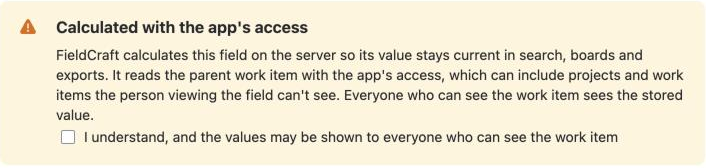
On a Rollup field's configuration page, the notice reads:
"FieldCraft calculates this field on the server so its value stays current in search, boards and exports. It reads this work item's children with the app's access, which can include projects and work items the person viewing the field can't see. Everyone who can see the work item sees the stored value."
While a field waits
FieldCraft doesn't calculate or write a paused field anywhere.
The field keeps its last stored value.
-
When you hover over the value, you see Not recalculated until a Jira admin reviews this field in FieldCraft.
-
A reindex skips the field.
-
The space settings page shows it as Waiting for a Jira admin.
A new field of these types starts paused.
Confirm the notice in the recipe form, or on the field's first save, to acknowledge it right away.
Before you begin
-
Jira permission: Jira admin (the Administer Jira global permission). Space admins can't acknowledge app access.
-
FieldCraft: installed, with an active license.
Acknowledge on the Calculation tab
-
Go to Settings (⚙) > Marketplace apps > FieldCraft: Custom Fields.
-
Open the Calculation tab. Under Needs your attention, you see how many fields wait for your review.
-
In the row of the field, select Acknowledge.
warningAfter you acknowledge, everyone who can see a work item sees this field's value, even if it comes from work items they can't open.
Result: You see a confirmation, for example Story points on the epic acknowledged.
The field now updates when a work item changes or someone opens it. To update the rest, run a reindex.
Acknowledge from the banner
On every other tab of the admin page, a banner lists up to 5 paused fields.
-
Find the field in the banner.
-
Select Acknowledge next to it.
Acknowledge on the configuration page
-
Open the field's configuration page. See Configure a field.
-
Under Calculated with the app's access, select I understand, and the values may be shown to everyone who can see the work item.
-
Select Save. Until you select the checkbox, you can't save.
In the recipe form, select the same checkbox before you select Create field.
Related
-
Data security and privacy: what FieldCraft reads and stores.
-
Permissions: what Jira admins and space admins can do.
-
A field keeps its last value and doesn't update: find paused fields.
-
Rollup: add up values from children.