📂 Script Master
 | Script Master lets Jira and Confluence admins add their own scripts to the site: panels and actions on work items and pages, dashboard gadgets, macros, calculated fields, workflow rules, form changes, scheduled jobs and URLs other systems can call. You write JavaScript, or build rules without code, on one admin page, and switch each item on when it's ready. |
|---|
Get started: install the app and run your first script in about 10 minutes.
Why teams use it
- One app for many small changes. A panel on work items, a dashboard gadget, a Confluence macro, a required field on a transition and a nightly clean-up all live in one place, so you don't install a separate app for each.
- No build, no deploy. You write and test scripts in the Script Master admin page and turn them on there. There's no project to build and no app to deploy, except the Companion App you set up once for server scripts.
- Start from working code. Templates and snippets cover common tasks, such as listing a work item's contributors or requiring details for urgent work. A live preview runs your code with real data before anyone else sees it.
- Rules without code. Build validators, conditions and UI modifications from plain checks, such as Due date is set. Script Master writes the code for you.
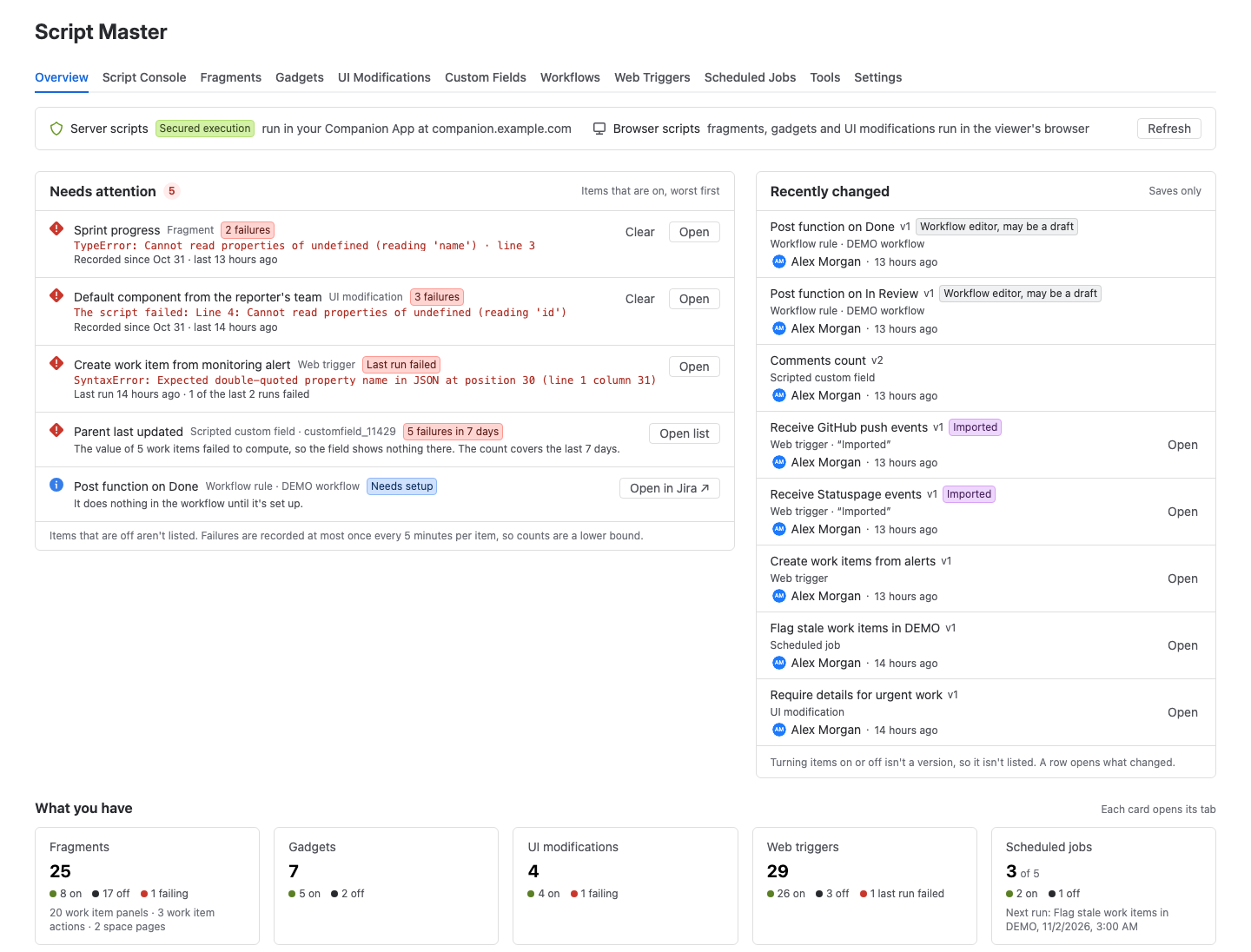
- Safe to change. Every save is a version you can compare and restore. Run history, failure banners and the Overview tab show what ran, what failed and what changed.
- Clear about who scripts run as. Scripts in the browser run as the person using them, with their permissions. Server scripts run as the app, in a Companion App you deploy under your own developer account.
Who it's for
- Jira admins add fields, workflow rules, form changes and work item panels that Jira doesn't offer out of the box.
- Confluence admins build macros and page actions for their teams, and make bulk changes to spaces and labels.
- Service desk admins add pages to service queues and adjust request forms in the service portal.
- Atlassian consultants and in-house developers connect Jira and Confluence to other systems through web triggers and scheduled jobs, and keep every script on the site in one admin page.
What you get in each product
| Feature | Jira | Confluence |
|---|---|---|
| Script Console: run one-off scripts and bulk changes as yourself | Yes | Yes |
| Fragments: your own HTML and JavaScript in the product's UI | Work item panel, work item action, space page, space settings page, queue page | Page action, page byline item, space page, space settings page |
| Gadgets on dashboards | Yes | Not available |
| Macros people insert into pages | Not available | Yes |
| UI Modifications: show, hide, require, lock, rename or pre-fill fields, and limit select options, while people fill in a form | Create dialog, transition screens, work item view, service portal | Not available |
| Scripted custom fields | Number, text, user, date and date-time fields | Not available |
| Workflow post functions, validators and conditions | Yes, validators and conditions also without code | Not available |
| Web Triggers: a URL that runs your script | Yes | Yes |
| Scheduled Jobs | Yes | Yes |
| Script Master Tools: bulk changes without a script, for the groups you choose | 2 tools | 7 tools |
| Version history, run history and the Overview tab | Yes | Yes |
| Marketplace app | Script Master for Jira | Script Master for Confluence |
The two apps are separate Marketplace listings with separate licenses. Install the one for each product you use.
Web triggers, scheduled jobs, scripted fields and post functions run on a server: a small Companion App that you deploy and connect once. Everything else works as soon as the app is installed.
Documentation
| Section | What you'll find |
|---|---|
| Get started | Install the app, open it in Jira or Confluence, and run a first script |
| Use cases | Contributors on work items, details for urgent work, a nightly job, alerts into Jira and a calculated field |
| Using Script Master | The admin page: tabs, Overview, version history, run history, failures, import and export, and Settings |
| Script Console | Run scripts in the browser, with snippets and examples |
| Fragments, Gadgets and Macros | Add your own UI to work items, pages, spaces and dashboards |
| UI Modifications | Change Jira forms while people fill them in, with rules or a script |
| Custom fields and Workflow extensions | Scripted fields, post functions, validators and conditions in Jira |
| Web Triggers, Scheduled Jobs and Listeners | Run scripts when another system calls, on a schedule, or from Jira Automation |
| Script Master Tools | Bulk changes to work items, pages, labels and spaces, with no script to write |
| Code editor | The editor, the external editor, Build script with AI and the AI prompt pages |
| Forge bridge API for browser scripts and Forge API for server-side scripts | The APIs your scripts can call |
| Administration | Install and update, permissions, licensing and the Companion App |
| Set up the Companion App and Data security and privacy | How server scripts run, what the app stores, and where data goes |
| Move a script to your own Forge app | Turn a fragment, gadget or other script into a standalone Forge app |
| Reference | Limits, known limitations, and differences between Jira and Confluence |
| Troubleshooting and FAQ | Fixes for common problems, and short answers |
What's new
- Q3 2026: Script Master Tools for bulk changes, who created and changed each item, and Build script with AI. Details
- Q1 2026: Server scripts run only in your Companion App. Details
- All changes
Get help
- Contact support with the product (Jira or Confluence), the module, what you did and a screenshot.
- Script Master for Jira and Script Master for Confluence on the Atlassian Marketplace