Web Triggers
A web trigger is a script with its own URL. When another system calls that URL, the script runs and Script Master sends its answer back to the caller.
Applies to: Script Master for Jira and Script Master for Confluence · Cloud
Use web triggers to receive data from other tools or to start work in Jira or Confluence from outside. With Jira Automation, you can also react to events.
How it works
- You write the script on the Web Triggers tab and save it. Script Master gives it a URL.
- A caller sends an HTTP request to the URL. The caller doesn't sign in.
- Script Master runs the script on the Forge back end, through your Companion App. The script gets the request as
request. - The script returns an object with a
statusCode, and Script Master sends it to the caller as the HTTP response.
The script runs as the app, not as a user. It calls Jira or Confluence with api.asApp(), so it isn't limited by the permissions of whoever calls the URL. See Web trigger request and response for the objects and the globals a script can use.
Anyone who has the URL can call it. Check a token or a secret header at the start of every script that reads or changes data. See Require a token on a web trigger.
The URL
The URL is Script Master's own Forge web trigger URL, which you copy from the editor. It isn't your Companion App's URL: callers never reach the Companion App directly. All web triggers on a site share one base URL. The id query parameter at the end, for example ?id=00000000-0000-0000-0000-000000000000, picks the web trigger. Keep it when you add your own parameters: a call without it gets 400.
The URL appears after the first save and stays the same when you change the script. Deleting the web trigger makes its URL stop working.
Turn a web trigger on or off
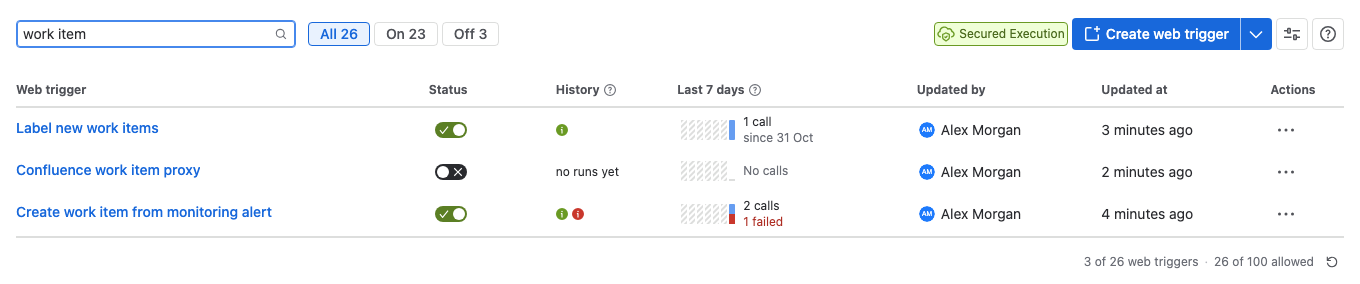
A new, duplicated or imported web trigger starts switched off. While it's off, calls get 403 and the script doesn't run. Turn it on with Enable in the editor, or with its switch in the Status column of the list.
What the list shows
| Column | What it shows |
|---|---|
| Web trigger | The title. Select it to open the editor. |
| Status | Whether the web trigger answers calls. |
| History | The last kept calls, oldest on the left. Select one for its details. |
| Last 7 days | Calls per day, with failed calls in red. |
| Actions | Edit, Version history…, Turn on or Turn off, Duplicate, Export and Delete… |
Run history explains the History and Last 7 days columns. Failures explains what a failed call records.
Limitations
| Limit | Value | What to do |
|---|---|---|
| Web triggers per site | 100 | Route several tasks through one web trigger with a query parameter or the HTTP method. |
| Rows per page in the list | 20 | Use the page numbers under the list, or Filter by name or description. |
| Title | 128 characters | Not applicable |
| Script size | 230 KiB | Move large data out of the script. |
| Kept calls per web trigger | The last 10 | Copy a call's details with Copy as JSON to keep them. |
| Successful calls recorded | At most one every 5 minutes per web trigger | Failed calls, and calls that log an error, are always recorded. |
| Output lines per call | 100 lines of up to 2,048 characters each | Log less, or return a summary. |
When calls arrive too fast, Script Master answers 429 without running the script. The caller should wait and try again.
Web triggers need a configured Companion App. Without one, the tab shows Action Required: This feature cannot function without companion app, and every call fails with 500.
Tasks
- Create a web trigger: write the script, turn it on and copy the URL.
- Test a web trigger: run the script with a sample request before you save.
- Web trigger request and response: the
requestobject, the response, and the status codes Script Master sends itself. - Require a token on a web trigger: reject calls that don't carry your secret.
- Call a web trigger from Jira Automation: run a script when someone creates or changes a work item.
Examples
- Show Jira work item statuses on a Confluence page: a Jira web trigger as a proxy, so a Confluence page can show live work item statuses.
Related
- Set up the Companion App: deploy and connect the app that runs back-end scripts.
- Forge API for server-side scripts:
api,routeand the other globals. - Web Triggers AI prompt: the API reference to give an AI assistant.
- Version history: compare and restore earlier versions of a script.