Data security and privacy
This page describes what Script Master stores, where your scripts run, what leaves your site, and who can see it. It covers both Script Master for Jira and Script Master for Confluence. Use it for your security review, together with the privacy and security tab of the Marketplace listings for Jira and Confluence.
Where the app runs
Script Master is built on Atlassian Forge. Its code and storage run on Atlassian's infrastructure. Your scripts run in three places:
| Scripts | Where they run | As whom |
|---|---|---|
| Script Console, fragments, gadgets, macros, UI modifications, Script Master Tools | In the browser of the person using them, inside a frame in Jira or Confluence | That person |
| Web triggers, scheduled jobs, scripted fields, post functions | In your own Companion App, a Forge app you deploy under your own developer account | The Companion App |
| Validators and conditions | In Jira, which evaluates their Jira expressions | Jira |
Script Master can send data to addresses outside Atlassian, because your scripts can. For that reason it isn't eligible for Atlassian's Runs on Atlassian program.
What the app stores
Script Master keeps its data in Forge hosted storage, inside your site's app installation.
| Data | What it holds | How long |
|---|---|---|
| Items: fragments, gadgets, macros, UI modifications, web triggers, scheduled jobs | Title, description, code, settings, whether it's on, and the account IDs of the people who created and last changed it, with the times | Until you delete the item |
| Versions | A copy of an item, a scripted field's script or a workflow rule at each save in Script Master, with the author's account ID, the time and an optional note | The latest 50 per item. Deleted with the item |
| Run history | For each web trigger, scheduled job and post function: the console output, the error, a preview of the return value and the duration of each run. Post function runs also keep the work item key and the workflow and transition names | The last 10 runs per item |
| Activity counts | Runs and failures per day, behind the Last 7 days column | 7 days |
| Health records | For fragments, gadgets, macros and UI modifications: how many times one failed in a browser, and the last error message, with tokens and email addresses removed | Until the item's code changes, or the item is deleted |
| Settings | The Companion App URL with its token, the error report setting, each tool's access level and group names, and which Overview checks you hid | Until you change them |
Scripted field code and post function, validator and condition settings are saved in Jira's own configuration of the field or workflow, not in Script Master. UI modifications are saved in Script Master and also in Jira, which needs them to change forms.
Script Master doesn't store people's names, email addresses or avatars: it looks them up when a page shows them. It doesn't copy work items, pages or other content, except what your own scripts write to the run history through console.log or their return value.
In your browser
- Script Console code that you save with the editor's save shortcut stays in your browser's local storage, not on the server.
- Unsaved editor changes are kept in your browser's local storage for up to 7 days, so a reload doesn't lose them.
What leaves your site
| Traffic | From | To | What it carries |
|---|---|---|---|
| Your scripts' own requests | The browser of the person running a browser script, or your Companion App | Any address your scripts call, load scripts or styles from, or show in a frame | Whatever your script sends |
| Server-side runs | Script Master's Forge functions | Your Companion App's URL (a Forge web trigger) | The script, its inputs (such as the web trigger request or the work item details) and the run's result |
| Companion App status check | An admin's browser, on the Overview, Settings, Web Triggers, Scheduled Jobs, Custom Fields and Workflows tabs, the Get started page, a scripted field's context editor and preview, and the post function editor | Your Companion App's URL | A request with the token in the URL, and nothing else |
| External editor | Script Master's Forge functions, when an admin connects an external editor | The HTTPS address the admin entered | A request for the code. Nothing from your site is sent |
| Error reports and usage counts | Script Master's Forge functions | Sentry, in the US | See below |
Script Master's manifest allows requests to any address, from its functions (fetch.backend: "*") and from browsers (fetch.client: "*"). It also lets pages load scripts, styles, images and frames from any address. That's what lets browser scripts reach your own systems and Script Master reach your Companion App. It also carries the error reports to Sentry.
Error reports and usage counts
Script Master sends error reports from its own code and usage counts to Sentry, hosted in the US, so we can find and fix problems. Jira and Confluence admins can turn this off in Script Master > Settings.
| What | Details |
|---|---|
| Sent | The app's own errors (type, a shortened message with values removed, and where in the app's code it happened), the app version, browser and operating system, which Script Master module was in use, whether the site has a license, counts of admin actions and of script runs and failures per day, your site's ID and a pseudonymous user ID |
| Never sent | Your scripts, fragments, gadgets, macros, UI modifications or expressions; script output, logs and errors; field values, work item and page content, titles and keys; request payloads; Companion App URLs and tokens; user names and emails |
How it works:
- Errors in your scripts aren't reported. They're your scripts' errors, not ours. Script Master counts them once a day, per module, from the counts it already keeps.
- The pseudonymous user ID is a salted hash of the Atlassian account ID, made on the server. Browsers send no user at all, and Sentry is told not to store an IP address.
- Reports from the browser go through the app's Forge function, which rebuilds each report from a fixed list of allowed fields and drops reports that didn't come from Script Master's own code.
- Nothing is sent on a page view, a web trigger call, a transition or a scripted field, unless Script Master's own code fails there.
Turn off error reports and usage counts
-
Open Script Master and go to the Settings tab.
-
In Error reports and usage counts, turn off Send error reports and usage counts.
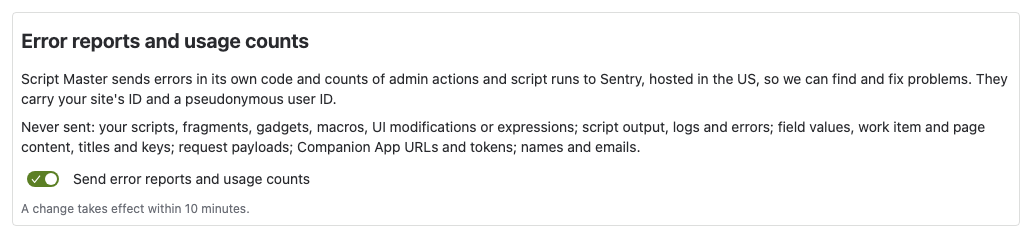
Result: Script Master stops sending error reports and usage counts within 10 minutes. The app works the same with the setting off.
Counters in Forge
Script Master also counts some events with Forge's own custom metrics, for example that a scheduled job ran or a web trigger was called. These are plain counters with a name only, kept by Atlassian and shown to us as totals in the Forge developer console. The Settings toggle doesn't stop them. To stop them, a site admin selects Disable custom metrics access in the app's details in Connected apps.
Who at Apportunity can see what
| What | Where we see it |
|---|---|
| Error reports and usage counts | Sentry, unless you turned them off |
| Counters | The Forge developer console, as totals, unless a site admin disabled custom metrics access |
| Log lines from Script Master's own functions | The Forge developer console. They can include item and work item IDs, and the error messages of failing scripts: scripted fields, fragments, gadgets, macros and UI modifications. Site admins can stop sharing them with Disable log access in the app's details in Connected apps |
| Anything else, such as your scripts, items or run history | Only what you send us in a support request |
Your Companion App is your own app, so its logs and metrics go to your own developer console, not ours.
Data residency
Forge hosted storage keeps Script Master's data in the same location as your Jira or Confluence site, and moves it with the site when an admin changes its data residency location. See Atlassian's Forge data residency page.
Data your scripts send elsewhere, and error reports in Sentry, are outside your site's data residency.
Encryption and deletion
All traffic between browsers, Forge, Jira, Confluence, the Companion App and Sentry uses HTTPS. Atlassian encrypts Forge hosted storage at rest.
| When you | What happens |
|---|---|
| Delete an item | The item, its versions and its health record are deleted |
| Uninstall the app | A reinstall starts with empty storage. Within 21 days, we can ask Atlassian to restore the data, with your consent: contact us through the support portal. After 28 days, Atlassian deletes it. Scripted field and workflow settings stay in Jira |
| Uninstall the Companion App | Script Master's server-side scripts stop running until you connect a Companion App again |
Sentry deletes error reports and usage counts after at most 90 days.
App permissions
Script Master asks for broad scopes because the scripts you write call Jira's and Confluence's REST APIs through it, and Forge allows only the calls the app's scopes cover. A browser script still runs with the permissions of the person using it. Server-side scripts use the Companion App's scopes, not these.
Script Master for Jira
| Scope | Used for |
|---|---|
read:jira-user | Checking that you're a Jira admin, reading a person's groups for tool access, showing people. Also available to your scripts |
read:jira-work | Checking that a viewer can see the space a fragment is limited to. Also available to your scripts |
write:jira-work, manage:jira-project, manage:jira-configuration, manage:jira-webhook | Script Master Tools (for example Bulk Set Resolution), saving UI modifications to Jira, and your scripts' calls |
read:servicedesk-request, write:servicedesk-request, manage:servicedesk-customer | Your scripts' calls to Jira Service Management |
read:cmdb-object:jira, write:cmdb-object:jira, delete:cmdb-object:jira, read:cmdb-schema:jira, write:cmdb-schema:jira, delete:cmdb-schema:jira, read:cmdb-type:jira, write:cmdb-type:jira, delete:cmdb-type:jira, read:cmdb-attribute:jira, write:cmdb-attribute:jira, delete:cmdb-attribute:jira, read:cmdb-icon:jira, read:cmdb-config:jira, write:cmdb-config:jira, delete:cmdb-config:jira, import:import-configuration:cmdb | Your scripts' calls to Assets |
storage:app | Forge hosted storage for items, versions, runs and settings |
Script Master for Confluence
| Scope | Used for |
|---|---|
read:confluence-user | Checking that you're a Confluence admin, showing people. Also available to your scripts |
read:confluence-groups | Reading a person's groups for tool access. Also available to your scripts |
read:space:confluence, read:confluence-space.summary | Checking that a viewer can see the space a fragment is limited to. Also available to your scripts |
write:space:confluence, write:confluence-space, read:label:confluence, write:label:confluence, delete:attachment:confluence, write:page:confluence | Script Master Tools (for example Clone Space, Replace Label, Delete Attachments and Insert Content into Pages), and your scripts' calls |
read:confluence-content.all, read:confluence-content.summary, read:confluence-content.permission, read:page:confluence, read:attachment:confluence, readonly:content.attachment:confluence, search:confluence, read:confluence-props | Script Master Tools and your scripts' calls |
write:confluence-content, write:confluence-file, write:confluence-props, delete:page:confluence, write:confluence-groups, manage:confluence-configuration | Your scripts' calls |
storage:app | Forge hosted storage for items, versions, runs and settings |
Subprocessors
| Subprocessor | Purpose | Data |
|---|---|---|
| Atlassian | Hosting, storage and compute (Forge) | All app data |
| Sentry (Functional Software, Inc.), US | Error reports and usage counts | Your site's ID, a pseudonymous user ID, technical error details and counts |
Your Companion App is your own Forge app on Atlassian's infrastructure, not a subprocessor of ours.
AI features
Script Master calls no AI service. Build script with AI opens Claude, ChatGPT or Gemini in a new browser tab, with a short prompt that points the assistant to a public reference page on this site. It only happens when you select it, and the prompt carries no code or data from your site. What you type into the assistant is between you and that service.
Report a security issue
Report a vulnerability or ask a security question through the support portal.
Related
- Permissions: who can use each part of the app, and whose permissions scripts use.
- The Companion App: where server-side scripts run.
- Install, update and uninstall the app: approving updates, and what uninstalling does.
- Atlassian's Forge platform security: how Forge isolates apps.