The Custom Fields tab
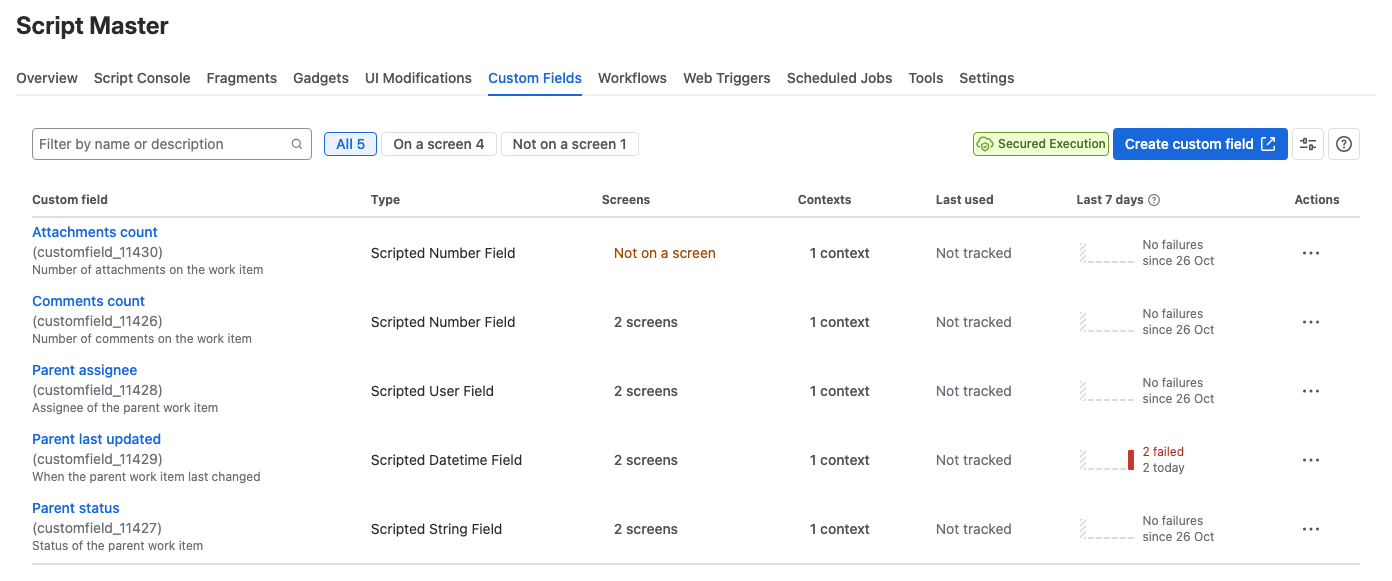
The Custom Fields tab lists every scripted custom field on your Jira site. Use it to see where each field is used, which ones fail, and to jump to the field's settings in Jira.
Applies to: Script Master for Jira · Cloud
Before you begin
- Jira permission: Jira admin (the Administer Jira global permission).
Columns
| Column | What it shows |
|---|---|
| Custom field | The field name and ID. Select the name to open the field's details in Jira. |
| Type | The field type, for example Scripted Number Field. |
| Screens | How many screens show the field. Not on a screen means nobody sees it on a work item yet. |
| Contexts | How many contexts the field has. Select it to open the contexts in Jira. |
| Last used | When the field last held a value. Jira tracks this only for some fields and plans, so it can read Not tracked. |
| Last 7 days | The work items whose value failed to compute, per day. |
| Actions | Links to the field's settings in Jira, and Move to trash…. |
To show or hide columns, use the column picker in the toolbar.
Failures in the Last 7 days column
Script Master counts a failure each time a field's script throws an error or returns the wrong type. Values that compute fine aren't counted, because Jira computes a field on every view and search.
- Counting stops for the day at 100, and the column then shows
100+. - Days are in UTC.
Filter the list
- Type in Filter by name or description to search by name, description or field ID.
- Select All, On a screen or Not on a screen to narrow the list.
The Actions menu
| Action | Opens |
|---|---|
| Edit details | The field's details in Jira, such as its name and description |
| Contexts and default value | The field's contexts in Jira, in a new tab, where you edit the script |
| Screens | The screens the field is on |
| Move to trash… | A confirmation. The field leaves screens and work items, and Jira deletes it for good after 60 days unless a Jira admin restores it. |
When the list is empty
With no scripted fields yet, the tab shows Create your first scripted custom field and a Create custom field button. The button opens Jira's Custom fields page.
Related
- Create a scripted custom field: add a field from this tab.
- Write the field script: change what a field computes.
- Navigate the admin page: tabs, lists and common controls in Script Master.