Settings shows "Invalid Configuration"
What to check when Script Master can't reach your Companion App.
Symptom
On the Settings tab, Secured Execution shows Current status Invalid Configuration, and the text field is outlined in red. Server-side scripts fail.
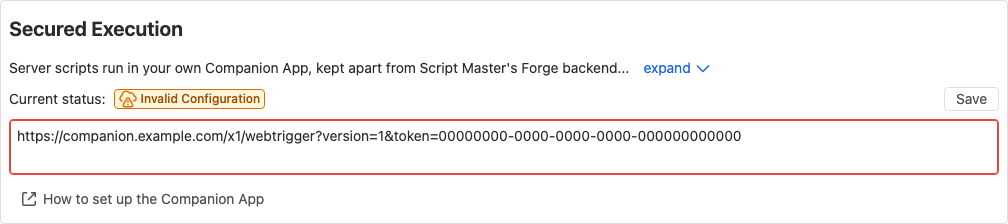
Find the cause
- Copy the URL from the text field.
- Open it in a new browser tab. Your browser shows a short JSON answer from the Companion App, or an error page.
- Read
statusTextin the answer, and go to the matching cause below.
| What you see | Cause |
|---|---|
Accepted. Ready to serve. | The Companion App answered too slowly |
Invalid token | The token was replaced |
Missing "token" query parameter, Missing "version" query parameter | The URL is incomplete |
Unsupported API version | The Companion App is out of date |
App not initialized. Please configure it first. | The Companion App has no token yet |
| An error page, or nothing | The Companion App isn't installed |
The URL contains your Companion App's secret token. Open it only in your own browser, and don't send it to anyone.
The token was replaced
Cause: Someone selected Recreate on the Companion App's page. The old URL stopped working.
Solution: Copy the new URL from the Script Master: Companion App page, paste it into Secured Execution in place of the old one, and select Save.
The URL is incomplete
Cause: Part of the URL was lost when it was copied. It must end with ?version=1&token= and the token.
Solution: Copy the URL again with the copy button next to Token on the Script Master: Companion App page, paste it, and select Save.
The Companion App is out of date
Cause: The deployed Companion App is older than the one Script Master expects.
Solution: Pull the latest code of the Companion App and deploy it again. See The Companion App.
The Companion App has no token yet
Cause: The Companion App makes its token the first time someone opens its admin page.
Solution: Open the Script Master: Companion App page in your product's admin settings, copy the URL it shows, paste it into Script Master, and select Save.
The Companion App isn't installed
Cause: The Companion App was uninstalled from the site, or the URL belongs to a different site or app.
Solution: Install the Companion App again and connect it. See Set up the Companion App.
It answered too slowly
Cause: The status check gives up after 10 seconds, and the Companion App took longer than that to answer.
Solution: Reload the Settings tab. If the status changes to Secured Execution, nothing else is needed.
Still not working?
Contact support with a screenshot of the Settings tab and the statusText you saw. Don't send the URL itself.
Related
- The Companion App: what each status means.
- A run fails with "Remote execution failed": the same problems, seen in a run's history.