Script Console output
After a run, the Script Console shows what the script returned, any error, and what it printed, below the editor.
Applies to: Script Master for Jira and Script Master for Confluence · Cloud
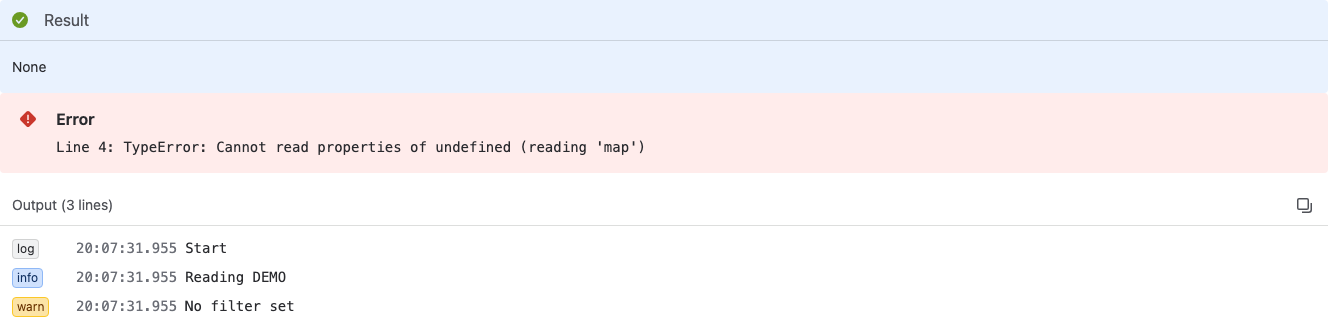
Result
The Result panel shows the value after the script's return.
| The script returns | Result shows |
|---|---|
| A string | The text |
A number, true or false | The value, marked JSON |
| An object or an array | Indented JSON, marked JSON |
A string that holds JSON, for example from JSON.stringify() | Indented JSON, marked JSON |
Nothing (no return) | None |
To show a list with one entry per line, return an array, for example return issues.map(issue => issue.key);.
The copy icon in the panel's header copies the result.
Output
The Output panel lists, in order, every line the script printed with console.log(), console.info(), console.warn() or console.error(), each with its level and the time to the millisecond. The header counts them, for example Output (3 lines).
When the script printed nothing, the panel says No output. Lines your script prints with console.log() appear here.
Copy output (the copy icon in the header) copies all lines as text, one per line with time and level.
The lines also go to your browser's developer console.
Output limits
A run keeps:
- up to 100 lines,
- up to 2,048 characters per line (a longer line ends with
...), - up to 150,000 bytes for all lines together.
When your script prints more, the last line is a warning that says how many lines Script Master dropped. To see a large value, return it instead of printing it: Result has no such limit.
Error
When the script throws an error, a red Error panel shows the message. An error from a line of your script starts with the line number:
Line 4: TypeError: Cannot read properties of undefined (reading 'map')
Lines printed before the error still appear under Output, so add console.log() calls to see how far the script got.
Related
- Run a script: run a script and keep it in your browser.
- Use the Snippets library: ready-made scripts to adapt.
- Run history: where Script Master keeps web trigger and scheduled job runs.