Convert rules to a script
Turn a rules UI modification into a script when the rules can't express what you need. The script starts with the same behavior as the rules.
Applies to: Script Master for Jira · Cloud
Before you begin
- Jira permission: the Administer Jira global permission.
- Every rule has its fields picked. Until then, Convert to script… shows Finish the rules first.
Converting is one-way: you can't turn a script back into rules. To keep the rules, select More actions > Duplicate first and convert the copy.
Convert the rules
-
Open the UI modification in the editor.
-
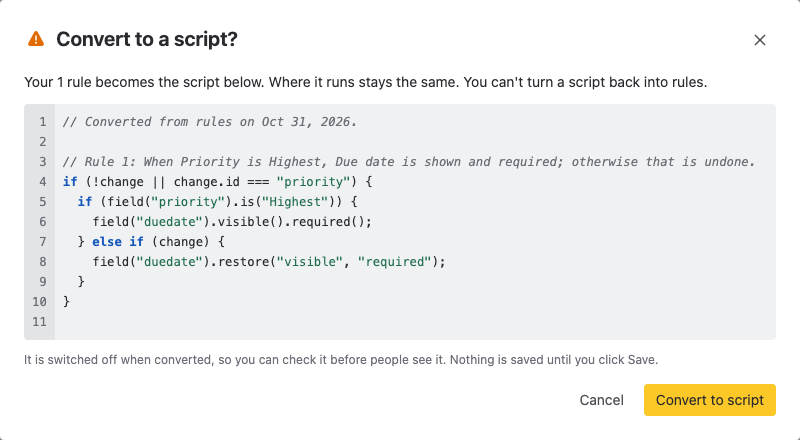
Select More actions > Convert to script…. The Convert to a script? dialog shows the script your rules become.
-
Read the script. If more than one rule changes the same field, a warning names the field: check how the script undoes those changes.
-
Select Convert to script. The editor shows the script and switches the UI modification off.
-
Check the script, turn on Enable, and select Save. Script Master saves nothing until you do.
Result: the UI modification is a script, with the same Where it runs as before.
Related
- UI modification script API: what the converted code can do next.
- Write a UI modification script: test the script on a real form.
- Manage UI modifications: duplicate a UI modification before you convert it.