Set who can use each tool
Choose, tool by tool, who finds it on the Script Master Tools page. You can hand one team a single bulk operation without giving anyone the rest of Script Master.
Applies to: Script Master for Jira and Script Master for Confluence · Cloud
Before you begin
- Jira or Confluence permission: you're a Jira admin or a Confluence admin, so you can open Script Master. See Using Script Master.
The access levels
Each tool has one rule.
| Level | Who sees the tool |
|---|---|
| All users | Everyone who can open the Script Master Tools page. |
| Restricted to groups | Members of the groups you pick. |
| Disabled | Nobody. The tool isn't on the page. |
A tool you never set keeps its default. Most tools default to All users.
Two Confluence tools carry a Caution tag and default to Disabled, because they delete data:
| Tool | What it deletes |
|---|---|
| Delete Attachments | Whole attachments, moved to the space trash. |
| Delete Attachment Versions | Old versions, permanently, with no trash. |
They stay disabled until you change their level.
Set a tool's access
-
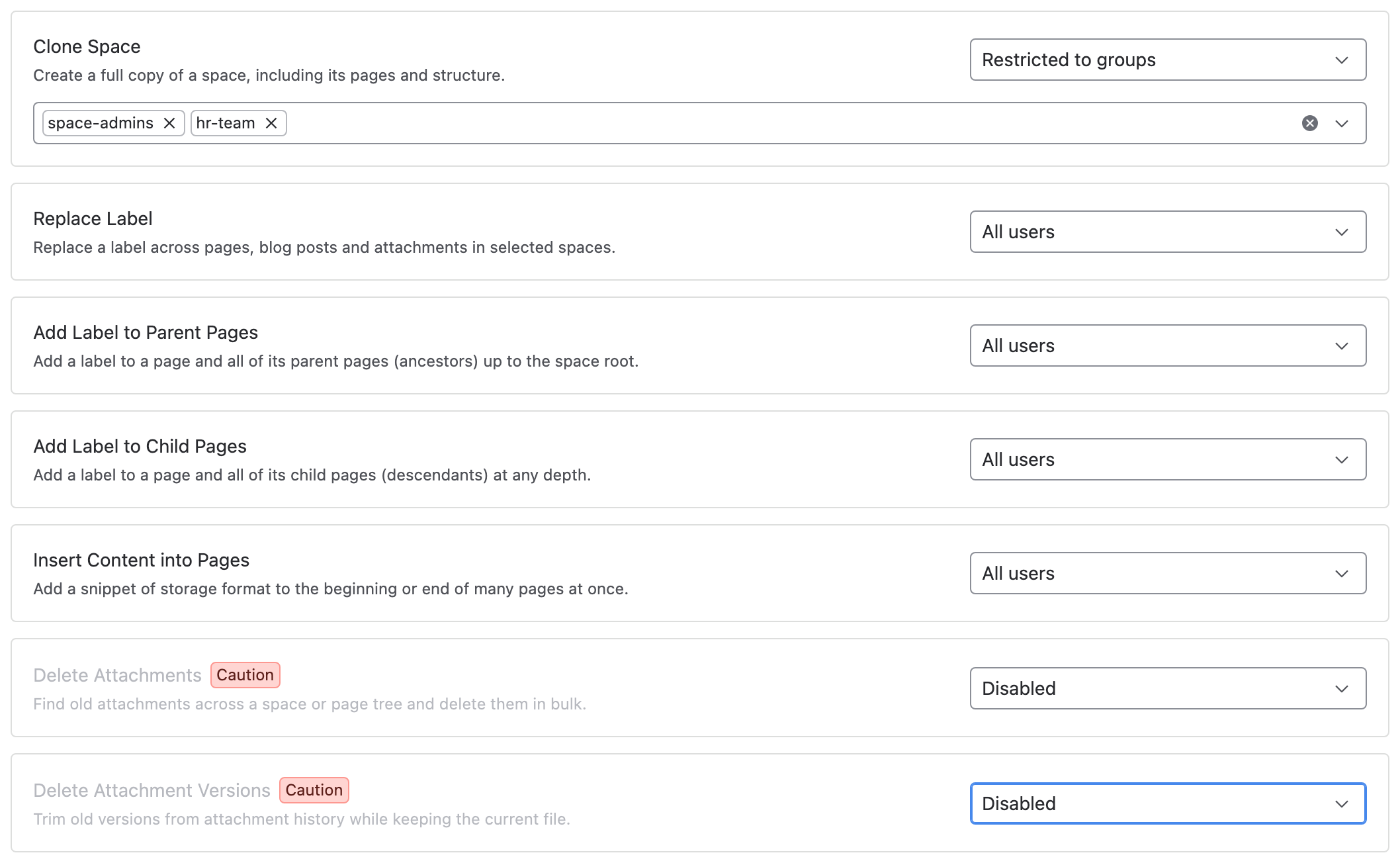
In Script Master, select the Tools tab. Each tool has its own row with an access select.
-
In the tool's row, choose All users, Restricted to groups or Disabled.
-
For Restricted to groups, pick one or more groups in the picker that appears under the row.
-
Select Save.
Result: a message confirms the save, and the rule applies straight away. People see the change the next time they open or reload the Script Master Tools page.
How Script Master applies the rule
When someone opens the Script Master Tools page, Script Master looks up their groups on its Forge backend. It returns only the tools their rules allow, so the group settings never reach their browser.
A person sees every All users tool, plus every Restricted to groups tool that names one of their groups. If Script Master can't read their groups, it treats them as a member of no group, so restricted tools stay hidden.
What tool access doesn't do
Tool access decides what the Script Master Tools page shows. It isn't a security boundary. Every tool works through the ordinary Jira or Confluence API as the person running it. So Disabled hides a tool, but someone with the product permission can still make the same change another way.
- Someone who can't see a tool can't run it from the Script Master Tools page.
- Product permissions still apply to every change. Nobody gains access to content they couldn't already change.
- To stop an operation outright, remove the Jira or Confluence permission that allows it.
After you rename a group
Access rules store group names, not group IDs. Rename a group in Jira, Confluence or your identity provider, and the rule stops matching it. The tool then disappears for that group without a warning. After a rename, open the Tools tab, pick the group again and select Save.
Related
- Tools: every tool and how a run works.
- The Tools page shows no tools: what to check when a tool is missing.
- Tools limits and behavior: what a run can and can't do.