Delete old attachment versions
Delete old versions from attachment history and keep the current file, so a space stops using storage on versions nobody opens. On the Tools page, this is Delete Attachment Versions.
Applies to: Script Master for Confluence · Cloud
Before you begin
- Confluence permission: permission to delete attachment versions on the pages in scope.
- App permission: an admin has set Delete Attachment Versions to All users or Restricted to groups. The tool starts out Disabled. See Set who can use each tool.
Delete old versions
-
Go to Apps > Script Master Tools, then select Delete Attachment Versions.
-
Under Scope, choose Whole spaces and pick the spaces, or choose Custom scope (CQL) and enter a query. With Whole spaces, you can also pick a page in Page tree. A page tree can hold up to 100 pages, the picked page included; for a bigger one, pick a page lower down or use Custom scope (CQL).
-
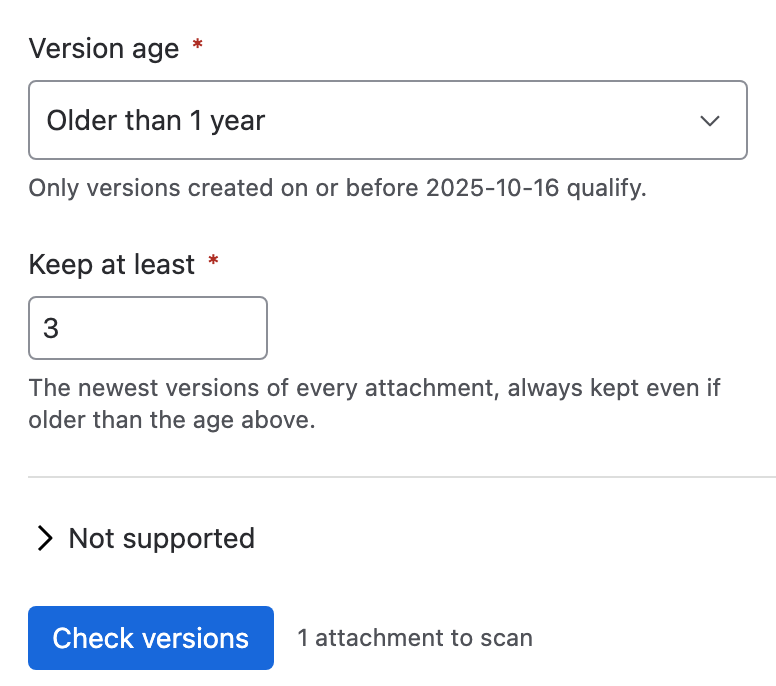
Under Version age, choose how old a version must be, for example Older than 1 year.
-
In Keep at least, set how many of the newest versions of each file to keep whatever their age. The default is 3, and the most is 100.
-
Select Check versions. The tool reads each file's history and lists only the files with versions to delete.
-
Clear the rows you want to keep, then type
DELETEin Type DELETE to confirm. -
Select the Delete button, which shows the number of selected versions.
warningDeleted versions don't go to the space trash. Nothing can bring them back.
Result: Version history trimmed says how many versions were deleted, across how many files. Each file's current version stays.
How the keep rule works
- The current version is never deleted.
- The newest Keep at least versions stay, whatever their age.
- Of the rest, only versions created on or before the age cutoff are deleted. A version with no recorded date counts as too new.
For example, a file has 10 versions, all over a year old. With Version age set to Older than 6 months and Keep at least set to 3, the tool deletes versions 1 to 7.
What the check tells you
| Line | What it means |
|---|---|
| N attachments have versions that match the age and keep rule | Files with versions to delete. Zero is a warning, not a failure. |
| Only the first 1,000 attachments in scope are included | The scope holds more files. Narrow it and run the tool again for the rest. |
| N versions selected across N attachments | The rows you left selected. |
| The current version of every file is kept | Always true. |
| This cannot be undone | Versions don't go to the trash. |
The tool looks at up to 1,000 attachments per run, fewer than other tools, because it reads each file's history before you confirm.
What it changes
| Item | Effect |
|---|---|
| Old versions | Deleted for good. |
| The current version and the attachment | Kept. To remove whole files, use Delete attachments in bulk. |
| Page watchers | Not emailed. |
| Space logos and files not on a page | Left out. The tool only lists files attached to pages. |
| Freed storage | Not reported. Confluence Cloud doesn't give a size per version. |
Related
- Delete attachments in bulk: remove whole files, with a way back through the trash.
- Set who can use each tool: why this tool starts out disabled.
- Tools limits and behavior: retries and partial failures.