Delete attachments in bulk
Move old or unwanted attachments to the space trash in one run, without opening every page. On the Tools page, this is Delete Attachments.
Applies to: Script Master for Confluence · Cloud
Before you begin
- Confluence permission: permission to delete attachments on the pages in scope.
- App permission: an admin has set Delete Attachments to All users or Restricted to groups. The tool starts out Disabled. See Set who can use each tool.
Deleted attachments go to the space trash. You can restore them from there until someone purges the trash, which is a separate step in Confluence.
Delete attachments
-
Go to Apps > Script Master Tools, then select Delete Attachments.
-
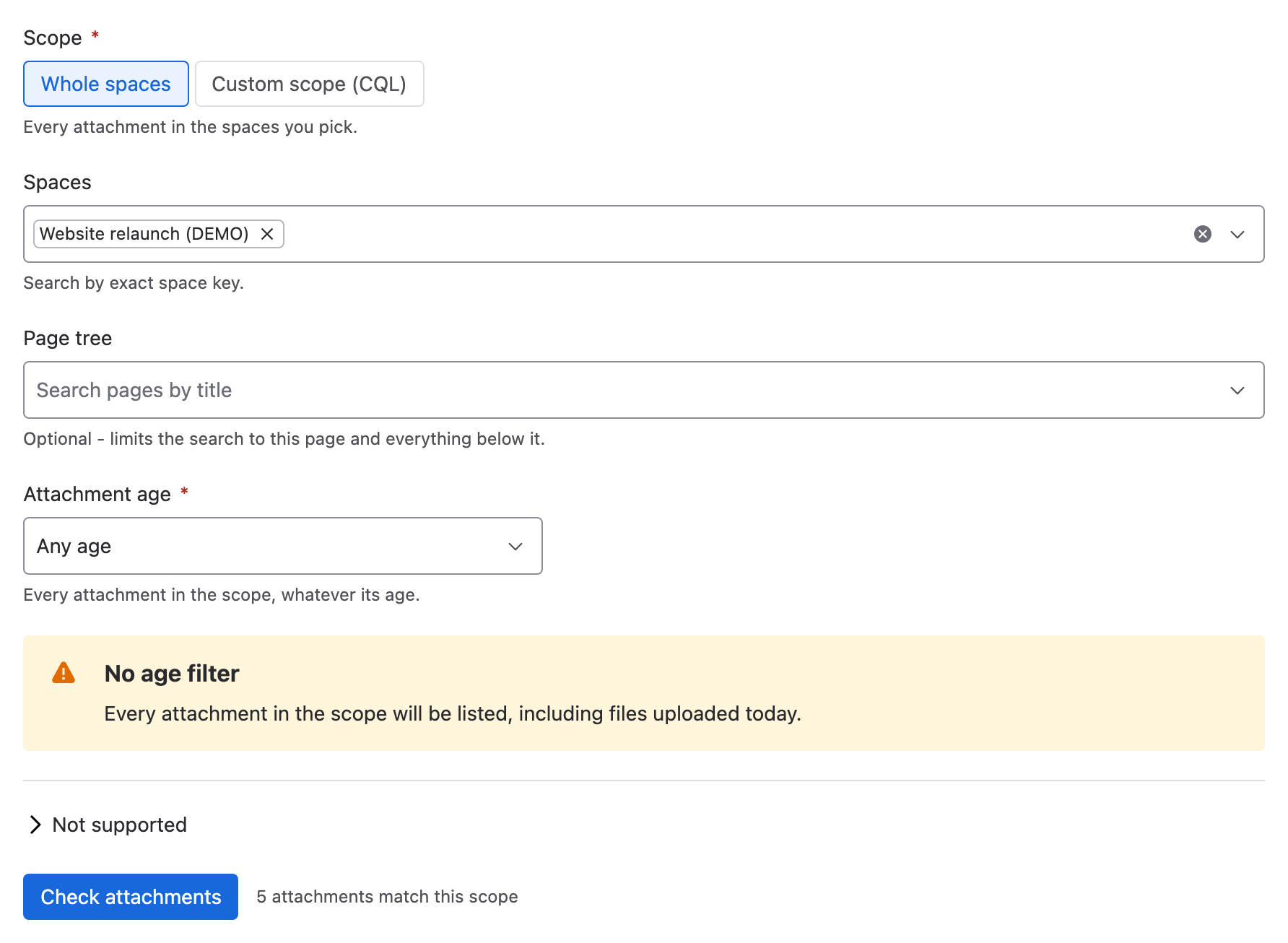
Under Scope, choose Whole spaces and pick the spaces, or choose Custom scope (CQL) and enter a query. With Whole spaces, you can also pick a page in Page tree to limit the run to that page and the pages below it. A page tree can hold up to 100 pages, the picked page included; for a bigger one, pick a page lower down or use Custom scope (CQL).
-
Under Attachment age, choose how old a file must be: Older than 6 months, Older than 1 year, Older than 2 years, Older than 5 years, Custom… or Any age. A custom age is a whole number up to 100, in days, weeks, months or years.
-
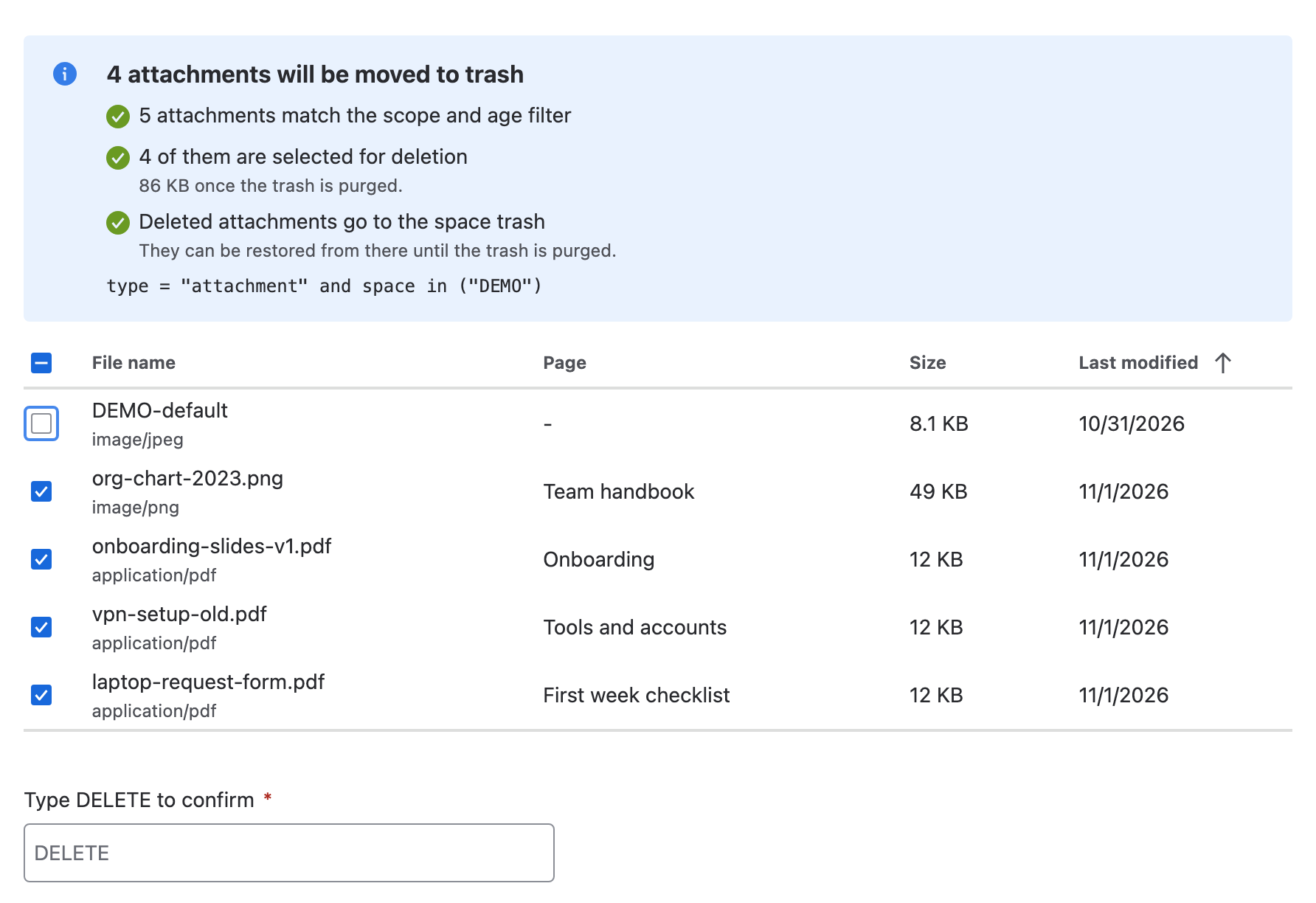
Select Check attachments. A table lists the matching files with their page, size and last-modified date, 20 rows a page. Every row starts selected.
-
Clear the rows you want to keep.
-
In Type DELETE to confirm, type
DELETE. -
Select the Delete button, which shows the number of selected attachments.
noteThe files go to the space trash. Once someone purges the trash, the deletion is permanent.
Result: the summary says how many attachments moved to the trash and how many had already been deleted. It lists up to 10 failures with the reason for each.
What the check tells you
| Line | What it means |
|---|---|
| N attachments match the scope and age filter | How many files the query found. Zero is a warning, not a failure. |
| Only the first 5,000 attachments are included | The scope matched more. Narrow it and run the tool again for the rest. |
| N of them are selected for deletion | The rows you left selected. Frees N KB once the trash is purged says how much storage they take. |
| Deleted attachments go to the space trash | You can restore them until the trash is purged. |
What it changes
| Item | Effect |
|---|---|
| Each selected attachment | Moved to the space trash, with all its versions. |
| The page it's on | Unchanged. |
| Page watchers | Not emailed. |
| Storage | Freed only when someone purges the space trash. |
| Space logos and files not on a page | Left out. The tool only lists and deletes files attached to pages. |
A file someone else deleted between your check and your run counts as already deleted, not as a failure.
Undo a run
Restore the files from the space trash in Confluence. Once someone purges the trash, they're gone for good.
Related
- Delete old attachment versions: keep the file and remove its old versions.
- Set who can use each tool: why this tool starts out disabled.
- Tools limits and behavior: the cap, retries and partial failures.