Copy custom field values
Copy one custom field's value into another on every work item a JQL query returns, for example when you move to a new field. On the Tools page, this is Copy Custom Field Values.
Applies to: Script Master for Jira · Cloud
The tool reads the source field, converts the value where it has to, and writes the target field. It handles custom fields only, so system fields such as Assignee and Priority aren't in the pickers.
Before you begin
- Jira permission: permission to edit the work items your query returns. The target field must apply to each work item's space and work type.
- App permission: Copy Custom Field Values is available to you. It's available to all users unless an admin changed that. See Set who can use each tool.
Copy the values
-
Go to Apps > Script Master Tools, then select Copy Custom Field Values.
-
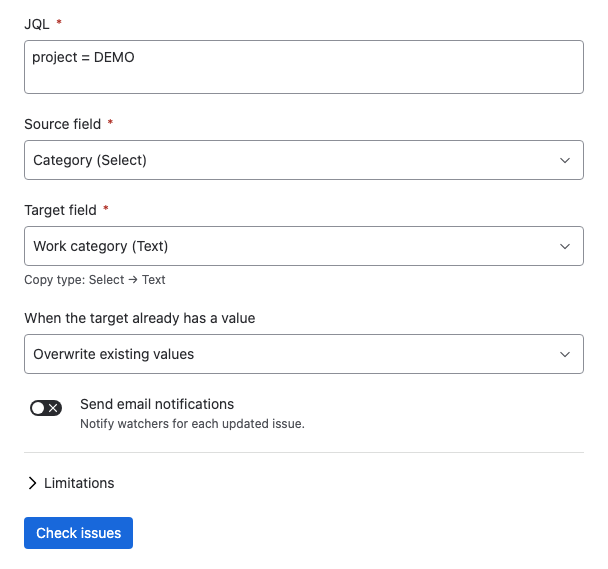
In JQL, enter the query that selects your work items, for example
project = DEMO. -
In Source field, pick the field to read. In Target field, pick the field to write. Each field shows its type in brackets, and Copy type under the target shows the conversion.
-
Under When the target already has a value, choose Overwrite existing values or Only fill empty target fields.
-
Leave Send email notifications off unless watchers should get an email for each work item.
-
Select Check work items, and read the report.
-
Select Copy values.
warningThe copy can't be undone. In Overwrite existing values mode, a work item whose source field is empty gets its target field cleared. Before you select Copy values, compare N of them have a source value to copy with the match count: the difference is how many target fields get cleared. Choose Only fill empty target fields to leave them alone.
Result: the summary under Values copied counts the updated and skipped work items, and lists up to 10 failures with the reason for each.
Which field pairs work
Two fields of the same type always work. These conversions work too:
| From | To | Result |
|---|---|---|
| Select | Multi-select | One option becomes a list of one. |
| Multi-select | Select | The first option is kept. The rest are dropped. |
| Select | Text | The option label is written as text. |
| Multi-select | Text | The labels are joined with commas. |
| Labels | Text | The labels are joined with commas. |
| User | Multi-user | One user becomes a list of one. |
| Multi-user | User | The first user is kept. The rest are dropped. |
Any other pair shows These field types can't be copied to each other. under Target field, and the check doesn't run.
Select values copy by label. The target field needs an option with the same label, or that work item is reported as failed.
What the check tells you
| Line | What it means |
|---|---|
| N work items match this JQL | How many work items the query found. |
| N of them have a source value to copy | Work items whose source field isn't empty. |
| Only the first 5,000 work items are included | The query found more. Narrow it and run the tool again for the rest. |
| Copy type: Select → Text | The conversion this pair uses. |
| Existing target values will be overwritten | Or Work items whose target field is already set will be skipped in Only fill empty target fields mode. |
| Watchers will be notified by email | Or Watchers will not be notified, matching Send email notifications. |
Undo a run
The tool has no undo, and nothing keeps the target field's earlier values. Nothing can reverse a run in Overwrite existing values mode. When you can, choose Only fill empty target fields, which never replaces a value.
Related
- Set the resolution on many work items: the other Jira tool.
- Tools limits and behavior: the cap, retries and partial failures.
- Tools: every tool and how a run works.