Test a post function
Run a post function's script against a work item from the editor, without moving the work item. Use it to check the script's output and errors before you publish the workflow.
Applies to: Script Master for Jira · Cloud
Before you begin
- Jira permission: Jira admin (the Administer Jira global permission).
- A Jira admin has set up the Companion App. See Set up the Companion App.
- The post function's editor is open. See Add a post function.
- A work item you can change, for example one in a test space. The test runs the script for real.
Run the test
-
Under the editor, turn on Test with a work item. The test panel opens, with a warning that the test runs the script for real.
-
In Work item key or ID, pick the work item to test with.
-
Select Generate mocked payload. Payload fills with the work item and a sample transition.
-
Optional: edit the payload, for example to change
transition.name. -
Select Test post-function.
warningThe test runs the script for real. Every change the script makes, such as a comment, a field update or a deleted link, happens on your site.
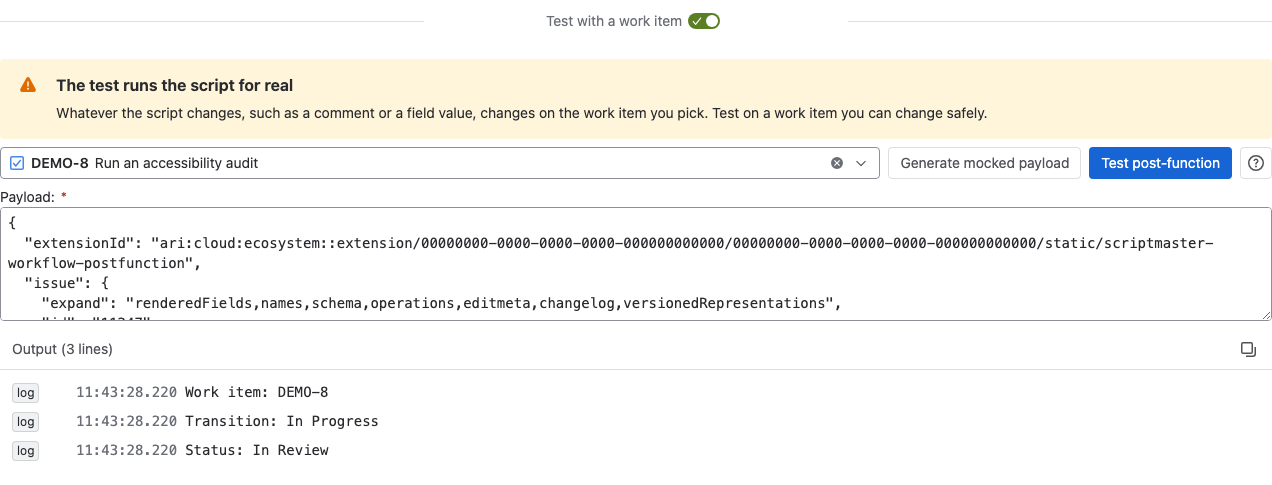
Result: The script's console output appears under the payload. If the script throws an error, a red Error box shows the message.
What the payload holds
The generated payload has the work item's summary, work type, creator, created date, space, reporter, assignee, updated date and status. The transition and workflow are samples: the transition is In Progress, and the workflow is Mocked workflow. If your script depends on the real transition, change those values in Payload before you run the test.
The test always runs the code in the editor, even if the payload you typed holds other code.
Related
- Workflow post functions: the full payload of a real run.
- Run history: the output of real runs after you publish.
- Script Console: try code outside a workflow.